
Download 10 Department budgets & consolidation
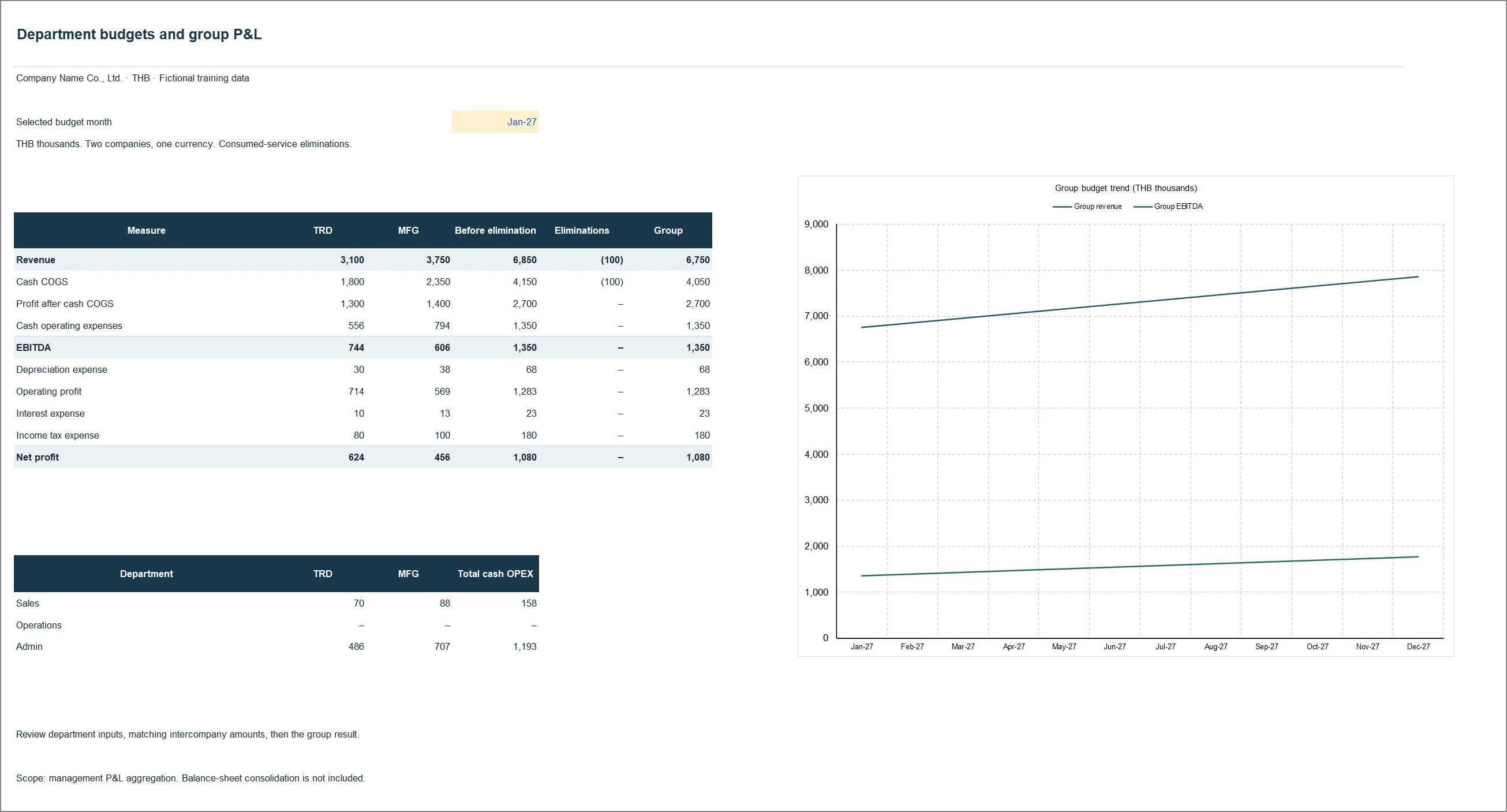
Each department enters its own budget; the file rolls them into a group P&L and removes internal transactions, each one traceable.
What is inside the file
The sheet list below is read out of the actual workbook when this page is built, not typed. If the file changes, the list changes with it.
Where to look first
- Read Setup first: entities, currency and the account mapping.
- Enter budgets on Sales, Operations and Admin. Each row needs a unique RowID; budget = units × rate unless Override is filled.
- Enter the intercompany elimination on Eliminations, with debits equal to credits.
- Choose the month on Summary, then review every row on Checks.
Read the guide to this report first →
What you need before using it on your own company
- Department budgets by month, account, units and rate.
- Transactions between group companies, with a reference both sides use.
- An account mapping that assigns revenue, COGS, OPEX, D&A, interest and tax.
The advanced reports use a new synthetic dataset. It is not a drop-in replacement for the original pack files, so the figures on this page cannot be compared with reports 01–07 even though the company name and currency are the same. This set also uses cash COGS with depreciation below EBITDA, a different cost definition from the core manufacturing model.
Check the file against the original
The SHA-256 values below come from the extension pack’s MANIFEST.json and are re-checked against the real files every time the site is built; a mismatch fails the build. To verify your copy yourself:
certutil -hashfile 10_Department_Budget_Consolidation_TH.xlsx SHA256sha256sum 10_Department_Budget_Consolidation_TH.xlsx| File | bytes | SHA-256 |
|---|---|---|
| 10_Department_Budget_Consolidation_TH.xlsx | 261,687 | e1bc84508ae0f9844b8dea4c7bce6fffe3765a99a802825679ff0b4fe1e8dd89 |
| 10_Department_Budget_Consolidation_EN.xlsx | 259,299 | 99e88d50321ac5923aaaa5b92b06eb88cd5fa0024eb2510185a6a38330a66a7a |
Use it in your work, change it, use it inside your company — no permission needed. The one ask is not to resell it as your own product. The figures are synthetic teaching data, not a real company’s results, and someone responsible for finance should review the formulas and costing policy before you run it on real numbers.
Download the workbook
What will you use this file for?
Optional. No personal details.
Thanks. This helps decide which files to build next.