
Power Query Studio
Data preparation you refresh instead of rebuilding each month
An Excel workbook of Power Query examples for accounting and finance work: cleaning Buddhist-era dates and Thai digits, removing rows revised after the fact, matching masters and reconciling, through to reading a paged API and combining a whole folder of files. Every example can be opened step by step in the Query Editor, with guides in Thai and English.
The workbooks and guides are finished; the terms of distribution are still being set. The download button will appear on this page when it opens.
What the recipes cover
Each recipe solves one problem, states what the starter data should give, and names what to watch for with real data.
Cleaning
Clean text, Thai digits and Buddhist-era dates · Keep the latest revision, deterministically · Route bad rows back to the source
Combining and matching
Merge masters, net sales and cost · Find customers missing from the master · Full outer reconciliation · Fuzzy match with a score and a review queue · As-of join: the price in force on the order date · Compare New / Changed / Deleted · Match the master valid at the time
Summaries and ranking
Group by month and channel · Top N by region · Running total by channel · 3-month moving average · Dense rank within a group · Customer RFM and segments to watch · Cohort retention by first purchase month · ABC / Pareto for products
Reshaping tables
Unpivot months that keep growing · Pivot channels into dynamic columns · Repair a report with blank group headers · Split several values in one cell into rows · Accept files whose column names differ · Unfold a two-row header
Dates and calendars
Fiscal calendar and business days · Count SLA days, skipping weekends and holidays · Filter a date range with parameters · Fill dates with no transactions via a calendar join
Advanced techniques
Unfold a reporting line with recursion · Explode a multi-level BOM · Select columns by pattern and transform them together · A custom incremental window
JSON, XML, HTML and APIs
Unfold nested JSON records and lists · Offline API pagination · Turn XML into a table · Read an HTML table with a CSS selector
Data quality
Profile every column · Flag outliers with IQR · Assertions for invariants and edge cases · Time and row counts of the last refresh
Connecting real sources
Combine a folder of CSV files with per-file status · Combine Excel tables from many workbooks · Paged REST with bounded retry · SQL parameters with native query folding · SharePoint folder limited to one path · PDF table extraction · OData entity · HTML table from a live website
Control figures after Refresh All
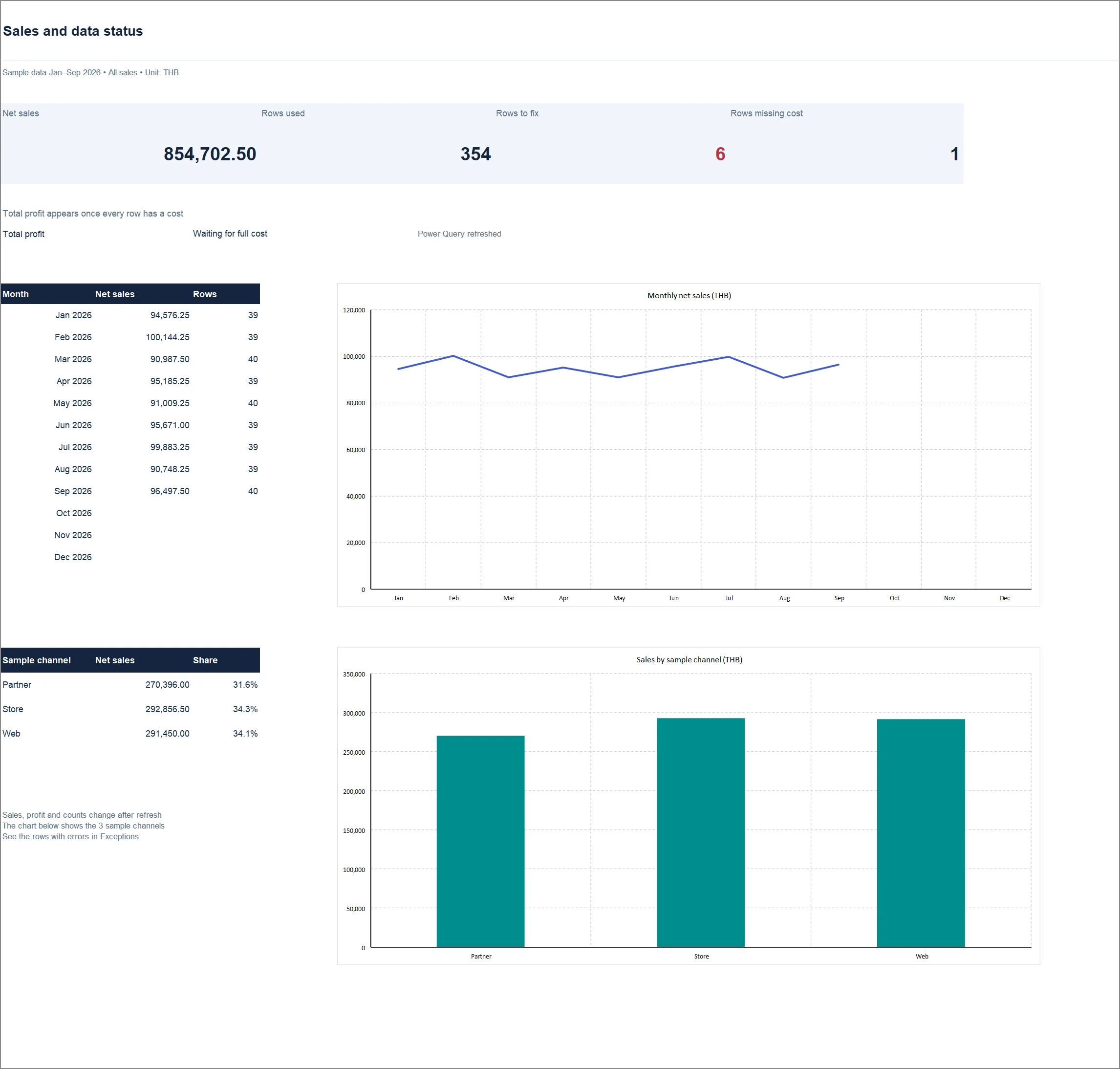
The practice data contains deliberate problems, such as 31 February, a quantity typed as text and a customer missing from the master. After a refresh the results must match this table. The values are read from the workbook when the site is built.
| Item | Value |
|---|---|
| Net sales (THB) | 854,702.50 |
| Rows used in the sales model | 354 |
| Rows routed back for fixing | 6 |
| Rows still missing a cost | 1 |
| Quality_Tests passed | 10/10 |
Every figure in the workbook comes from Refresh All in Excel for Microsoft 365 on Windows. The build stops unless every Quality_Tests row passes and the totals match the control figures. The Thai and English workbooks agree to the last figure. The CSV folder connector was tested against real files; REST, SQL and SharePoint must be configured and tested against your own systems.
What this report set contains
- Two Excel editions
Thai and English with identical data and results. No macros and no add-ins.
- Thai and English guides
Getting started, architecture, every recipe with its full M code, a data dictionary, connecting real data, troubleshooting, and exercises with the results Excel produced.
- M code as files
One query per file, ready to paste into the Advanced Editor of another workbook.
- Practice data
Raw sales with Thai digits, Buddhist-era dates, revisions and bad rows, plus masters and small tables for specific techniques.
Refreshing needs Excel for Microsoft 365 on Windows. Other apps can open the file but do not run Power Query.
Download the workbooks for reports 01 and 02
No registration and no email address. Thai and English editions, each with a SHA-256 value to verify the file.
All free downloads →
