
Monthly statements from a trial balance in Excel: map the accounts, turn YTD balances into months, and reconcile before it goes to management
Most small and mid-sized companies' accounting systems can export a trial balance, but not a management report in the layout the company uses. So at every month end someone copies balances from the trial balance into the report file line by line. It is slow, and when a figure in the report does not match the general ledger, nobody can tell which line went wrong. If Excel reads the trial balance through an account-mapping table instead, every figure in the report traces back to account codes, and next month the work is pasting in the new trial balance.
You need three parts: an account-mapping table that says which statement line each account code goes to, SUMIFS formulas that total by line and month, and checks that confirm the balance sheet balances and cash agrees with the trial balance. If the trial balance holds year-to-date balances, the monthly P&L is this month's YTD balance minus last month's.
Why a monthly report should start from the trial balance
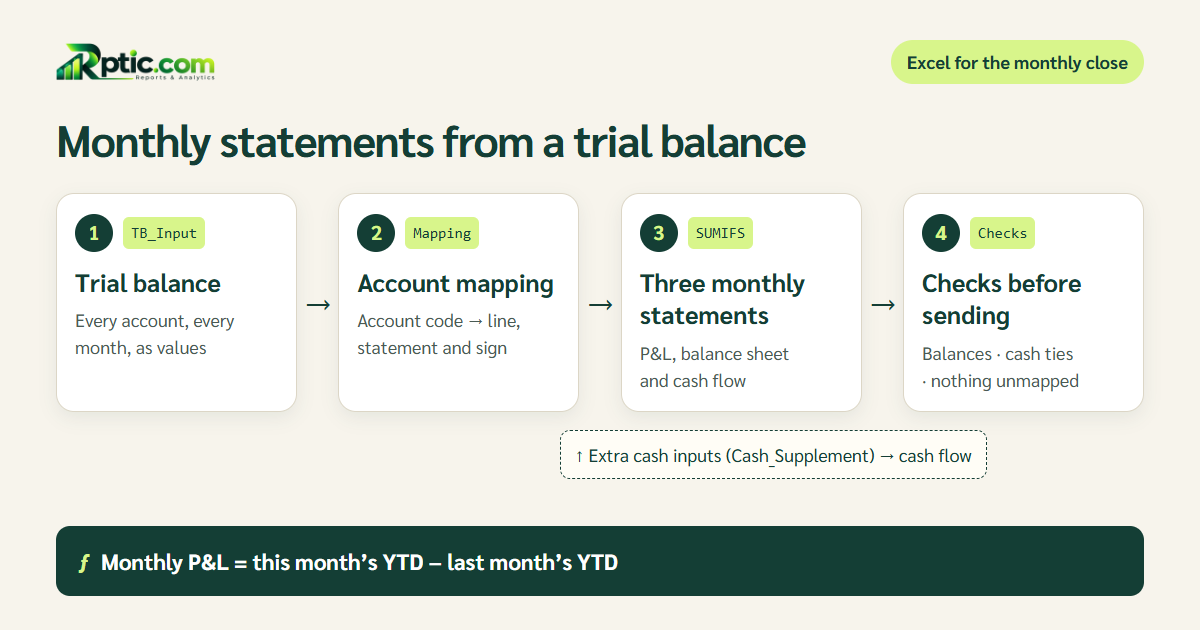
The trial balance is the one report that holds every general ledger account at once, and its debits always equal its credits. If the management report is calculated from that single trial balance, the revenue, receivables, cash and expenses in it come from the same source accounting closed the books on. Nobody has to explain why revenue in the sales report differs from the P&L.
The usual problem in companies that build reports by copying is that each part comes from a different place: revenue from a sales report, expenses from accounting's file, cash from a bank statement. When they disagree, someone has to chase it. Making the trial balance the main source does not ban other data. It means every report has to reconcile back to one set of numbers.
Once the figures reconcile to the trial balance, the next step is ordering the pages and writing variance commentary: see what a monthly management report should contain.
The account-mapping table
The mapping table tells Excel which line each account code goes to, which statement it belongs to, and whether its sign flips. One row per account code.
| Column | What goes in | Example |
|---|---|---|
| Account code | The code from the chart of accounts; no duplicates | 4100 |
| Account name | The name in the accounting system, for reading only | Sales of goods |
| Report line | The line shown in the statement; several accounts may share one | Revenue |
| Statement | Income statement or balance sheet | P&L |
| Sign | Asset and expense lines take 1; liability, equity and revenue lines take -1 so they show as positive | Revenue -1, expense 1 |
Contra-asset accounts, such as accumulated depreciation and the loss allowance on receivables, carry credit balances but take sign 1, like the assets they reduce, so they show as negatives under cost. Giving them -1 because they sit on the credit side overstates assets by twice the balance.
Account codes must be unique, and every account with a balance in the trial balance needs a row here. When accounting opens a new account mid-year, it has no report line yet. Without a check, its balance simply drops out of the report while the statements still look normal. Decide who approves every change to the mapping table.
The same table can carry a category column for the new presentation standard: see TFRS 18 and mapping the chart of accounts in Excel.
Get the trial balance into the right shape first
Every formula depends on the shape of the trial balance pasted in. Most errors happen at this step, not in the formulas.
- Paste values, not formulas or links. One row per account per month, with columns for period, account code, debit balance and credit balance.
- Debits and credits are never negative, and in each row one side is zero.
- Every account appears in every month, zero balances included. If an account is missing for one month, subtracting YTD balances gives the wrong monthly figure.
- Balance sheet accounts are closing balances, and P&L accounts are year-to-date balances before the year-end close.
- The last month of the year must be the pre-closing trial balance. After the closing entry moves profit into retained earnings, every P&L account is zero.
- Retained earnings in a pre-closing trial balance exclude this year's profit. The balance sheet has to add year-to-date net profit from the P&L to equity itself. Forget it and the balance sheet is out every month by exactly the YTD net profit.
- Include the month before the reporting window, as the opening balance for the balance sheet and cash flow.
Before pasting, ask whoever exports the trial balance which kind of balance the system produces. Some systems export the month's movements instead of YTD balances. In that case convert them first, or change the monthly formula so it does not subtract the prior month.
XLOOKUP and SUMIFS: map the accounts, total them, and turn YTD into months
With the trial balance in the right shape, the formulas come in three steps: work out each row's net debit, look up the report line and sign from the mapping table and multiply them into the presented amount, then total by line and month with SUMIFS. The sheet and column names match the downloadable workbook 08.
' Sheet TB_Input: A = period (1st of the month), B = account code, C = debit balance, D = credit balance
' Sheet Mapping : A = account code, C = report line, E = sign

' E: net debit
=C9-D9

' F: report line (an account missing from the map shows UNMAPPED)
=XLOOKUP(B9, Mapping!A:A, Mapping!C:C, "UNMAPPED")

' H: sign (a missing account gives #N/A, so its amount never turns into a silent zero)
=XLOOKUP(B9, Mapping!A:A, Mapping!E:E, NA())

' I: presented amount = net debit x sign
=E9*H9

' Report sheet: row 8 = period, one column per month; row 10 = YTD total of the "Revenue" line
=SUMIFS(TB_Input!I:I, TB_Input!F:F, "Revenue", TB_Input!A:A, C$8)

' Row 11 = monthly figure for the same line
' The first month of the financial year uses YTD as is; other months use this month's YTD (C10) minus last month's (B10)
=IF(MONTH(C$8)=1, C10, C10-B10)

' Check: nothing may stay unmapped
=COUNTIF(TB_Input!F:F, "UNMAPPED")
Because revenue and expenses both show as positive, gross profit and net profit are revenue lines minus expense lines, not a SUM of the whole column. The monthly formula assumes a January year start. If the company's financial year starts in another month, change MONTH(C$8)=1 to that month. Balance sheet lines need no subtraction: they are already month-end balances.
XLOOKUP is in Excel 2021 and Microsoft 365. On Excel 2019 or earlier, use INDEX with MATCH instead, for example =IFERROR(INDEX(Mapping!C:C, MATCH(B9, Mapping!A:A, 0)), "UNMAPPED"). The result is the same.
Once the monthly figures exist, year-to-date totals and a full-year forecast follow from the same table: see year-to-date and full-year forecast.
The cash flow needs data the trial balance does not separate
The P&L and balance sheet come straight out of the trial balance. The cash flow does not, because a trial balance only shows balances. It does not say whether an increase in fixed assets was paid in cash, or how much of a fall in debt was repayment and how much was new borrowing.
The extra inputs each month are cash paid for assets, cash received from asset disposals and the book value of what was sold, debt drawn and repaid, equity raised, and dividends paid. Enter zero in a month with nothing to report rather than leaving it blank, because a blank may mean not yet entered.
If these figures are incomplete, the cash flow will not agree with cash in the trial balance. Do not fix it with a balancing adjustment: the difference tells you something has not been recorded. For reading the gap between profit and cash that sits in receivables and inventory, see the cash conversion cycle.
Checks to run before the report goes to management
Checks surface mistakes before management does. Each check should compute a difference as a number and show a pass or review status, rather than rely on someone looking.
| Check | What it tests | If it fails |
|---|---|---|
| Mapping | Duplicate account codes, or accounts without a line, statement or sign | Fix the mapping table and have the approver review it |
| Trial balance input | Negative amounts, both debit and credit in one row, or the same account twice in a month | Export the trial balance again; do not edit amounts in the file |
| Period readiness | Every registered month has a complete trial balance and cash inputs, and the 12 months before the reporting month are all there | Fill in the missing month, or wait for the close |
| Cash supplement | Blank cells or negative amounts in the extra cash inputs | Complete them; enter zero for a month with nothing to report |
| Balance sheet balances | Assets equal liabilities plus equity, with year-to-date net profit included, every month | If the difference equals YTD net profit, this year's profit has not been added to equity; otherwise look for an account mapped to the wrong statement |
| Cash ties | Closing cash in the cash flow equals cash in the trial balance | Check the extra cash inputs |
| Fixed assets, debt, capital and retained earnings | Opening balance plus the month's movements equals the closing trial balance | Compare with the asset register and loan agreements |
One rule has no exceptions: never add a cash or equity plug to make a check pass. A report that passes every check because of a plug is less trustworthy than one that shows a single review flag with an explanation.
Next month: paste the new trial balance and recalculate
Once the file is built, the monthly work is four steps: paste the new trial balance, register the month and enter the extra cash inputs, recalculate, and read the checks before the statements. The time that went into copying becomes time for reading the numbers and writing variance commentary, which is what management actually wants.
If trial balances arrive as separate files per month or per company, Power Query can combine every file in a folder: one Refresh produces the new TB table with no copying. For comparing actuals with budget once the monthly statements exist, see budget variance analysis.
A sample workbook that follows every step here, with the mapping table, trial balance input, cash supplement, period register, checks and three monthly statements, is a free download. Read the guide to the workbook before using it on your company's data. The figures in it are synthetic training data.
Questions about trial balances in Excel
What is a trial balance?
A list of every general ledger account with its debit or credit balance at a date. Total debits must equal total credits. It is the starting point for financial statements and management reports.
How is a trial balance different from financial statements?
A trial balance lists every account with its debit or credit balance and shows the books are in balance. Financial statements group those balances into lines such as revenue, cost of sales, receivables and debt, and present them as a P&L, balance sheet and cash flow. The account-mapping table is the link between the two.
How do I get a monthly P&L from a YTD trial balance?
Subtract last month's year-to-date balance from this month's. The first month of the financial year uses its YTD balance directly. Every account must appear in every month, zero balances included, and the last month of the year must be the pre-closing trial balance.
Why doesn't the balance sheet from my trial balance balance?
Most often, year-to-date net profit has not been added to equity, and the difference equals that profit exactly. Other causes are unmapped accounts, accounts mapped to the wrong statement, a wrong sign on a contra-asset account, or accounts missing from a month's trial balance.
Which formulas total a trial balance by statement line?
XLOOKUP brings the report line and sign from the mapping table into each trial balance row, and SUMIFS totals by line and period.
Why doesn't the cash flow from my trial balance agree with cash?
Because a trial balance does not separate cash items such as asset purchases, debt drawn and repaid, equity raised and dividends. Enter those each month. If it still does not agree, find the missing item rather than adding a balancing plug.
What do I do with an account opened mid-year?
Add it to the mapping table before pasting that month's trial balance. If you forget, the formula shows Unmapped and the mapping check fails. Every mapping change should have an approver.